
Developers
Look inside every page.
Summit has the tools web developers expect, automation for testing, and a built-in MCP server for AI-assisted debugging. All of it is open source.
Developer tools
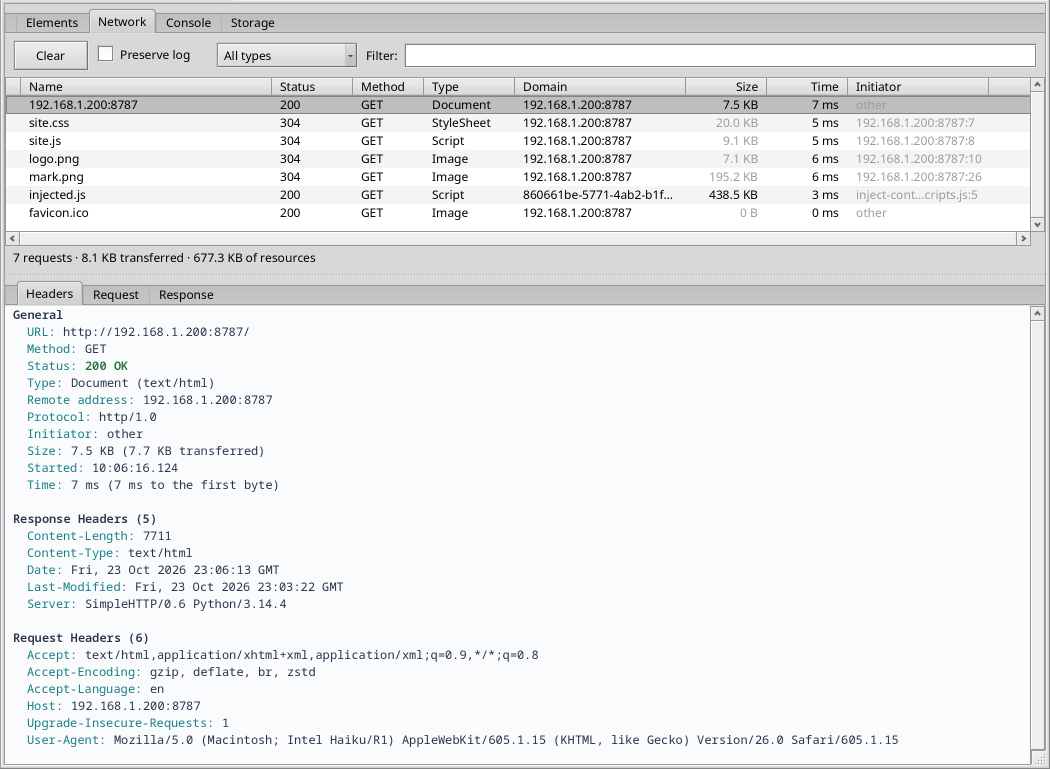
Open them from the page’s menu with Inspect Element, or the View menu. Elements shows the live DOM, matched and computed styles and the box model, with an element picker. Console shows JavaScript output, Network every request with headers and formatted responses, and Storage what the site keeps. View › View Page Source (Alt+U) shows the HTML as the server sent it.
Built-in MCP server
Summit can run its own Model Context Protocol server so a client such as Claude Code can inspect the running browser: tabs and pages through the Web Inspector protocol, the engine’s processes, JavaScript heap, caches, media players, compositors, logs and a sampling profiler.
It is off until you turn it on in Preferences › Developer, which also offers Copy Client Configuration. Requests need a random access token, and browser requests are refused.
claude mcp add --transport http summit http://127.0.0.1:7790/mcp \
    --header "Authorization: Bearer <token>"
WebDriver
summitdriver is WebKit’s WebDriver service, shipped with Summit as safaridriver is with Safari. Selenium, WebdriverIO or plain HTTP clients start a session; Summit opens an automated window with an orange address field. A session over plain HTTP:
summitdriver --port=4444 &

S=$(curl -s -XPOST localhost:4444/session -d '{"capabilities":{}}' | jq -r .value.sessionId)
curl -s -XPOST localhost:4444/session/$S/url -d '{"url":"https://example.com"}'
curl -s localhost:4444/session/$S/title
curl -s -XDELETE localhost:4444/session/$S
Extension APIs
Summit runs Chrome and Firefox WebExtensions natively: background scripts, content scripts, messaging, storage, tabs and windows, declarativeNetRequest and blocking webRequest, menus, commands, sidebars, cookies, containers, identity and more. Each API has its own design note and test record.
runtimetabswindowsstoragescriptingdeclarativeNetRequestwebRequestwebNavigationmenuscommandsactionsidePanelsidebarActioncookiescontextualIdentitiesidentityhistorybookmarksdownloadssessionstabGroupsi18ndebuggerdevtoolsuserScripts
Build from source
Summit’s application is C++ with native interfaces; the engine is WebKit with Summit’s patches in engine/patches. CI builds the air/OS and Haiku packages; for UI work, build against an engine staging directory. The portable core’s tests also run on Linux.
git clone https://github.com/airos-works/summit.git && cd summit

# The browser against an installed engine (on air/OS or Haiku)
pkgman install gcc make
make -j6 WEBKIT_PREFIX=/path/to/engine/staging
make check

# The portable core's tests, on Linux
cmake -S . -B build-host -DCMAKE_BUILD_TYPE=Debug
cmake --build build-host -j6
ctest --test-dir build-host --output-on-failure
Report a problem or help out
Bug reports with steps to reproduce, your air/OS or Haiku release and any crash report are the most useful thing you can send. Pull requests are welcome.
Get Summit
Reach the whole web.
Summit comes with every air/OS image, and installs on Haiku in two packages. Android, Linux and Windows are next.